Your Home Office Setup Matters More Than You Think
Working from home offers flexibility and comfort—until it doesn’t. Without the structure of a traditional office environment, many remote workers unknowingly create workspaces that strain their spine, shoulders, and neck. A poorly configured desk, a chair without proper lumbar support, or a monitor positioned too low can seem like minor inconveniences at first. But over weeks and months, these small ergonomic mistakes compound into chronic pain that interferes with your productivity and quality of life.
The good news is that most home office discomfort is preventable. By making intentional adjustments to your workspace, you can protect your musculoskeletal health and work pain-free. Let’s walk through the essential ergonomic elements every remote worker should address.
Monitor Placement: Eye Level Is Key
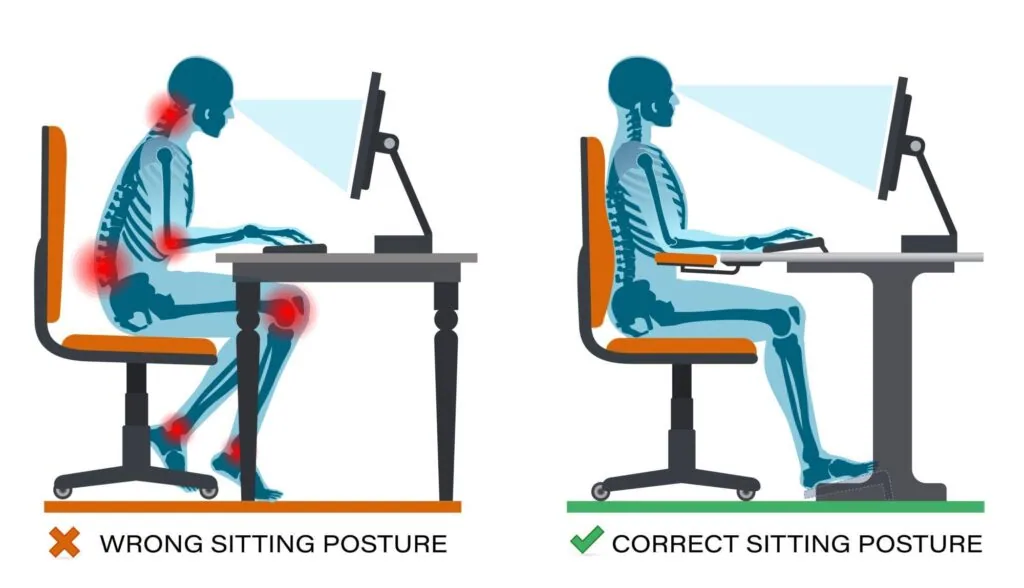
Your monitor should sit directly in front of you at arm’s length away—roughly 20 to 26 inches from your eyes. More importantly, the top of your screen should align with or sit slightly below eye level. When your monitor is too low, you crane your neck downward, straining the cervical spine. Over time, this forward head posture can lead to chronic neck pain and headaches. If you’re using a laptop, invest in an external monitor and keyboard to achieve proper positioning rather than hunching over your keyboard.
Desk Height and Keyboard Positioning
Your desk should be high enough that your elbows rest at roughly 90 degrees when your arms hang naturally at your sides. Your wrists should remain neutral and straight—not bent upward or downward—when typing. If your desk is too high, you’ll elevate your shoulders and strain your upper back. If it’s too low, you’ll hunch forward and compress your lumbar spine. Your keyboard and mouse should sit close to your body, about an inch or two from the desk edge, so you’re not reaching forward constantly.
Chair Support: The Foundation of Comfort
Your chair is your most important ergonomic investment. Look for one with adjustable lumbar support that fills the natural curve of your lower back. The seat height should allow your feet to rest flat on the floor or a footrest, with your thighs parallel to the ground. Armrests should support your forearms without forcing your shoulders up toward your ears. Avoid working from your bed or couch; soft surfaces don’t provide the spinal support your body needs during an eight-hour workday.
Additional Ergonomic Essentials
Beyond the big three—monitor, desk, and chair—consider these complementary adjustments:
- Footrest: If your feet don’t touch the floor comfortably, a footrest reduces pressure on your lower back.
- Document holder: Position reference materials at the same height and distance as your monitor to avoid repeated neck rotation.
- Lighting: Poor lighting increases eye strain and causes you to lean forward. Position your desk perpendicular to windows to reduce glare, and use a desk lamp for task lighting.
- Movement breaks: Even the best ergonomic setup can’t replace movement. Stand, stretch, and walk every 30 to 60 minutes.
Optimizing your workspace is a powerful preventive step, but it’s not always enough on its own. If you’ve already developed neck, shoulder, or lower back pain from years of poor positioning, chiropractic adjustments from Dr. Barton can help restore proper spinal alignment and reduce inflammation. Regular chiropractic care from Dr. Barton addresses the underlying musculoskeletal imbalances that develop from postural strain, allowing your body to heal and adapt to your improved workspace.
The combination of thoughtful ergonomics and chiropractic support creates a comprehensive approach to long-term spinal health. You’re removing the source of strain while simultaneously addressing any damage that’s already occurred.
If you’re experiencing persistent neck, shoulder, or back pain from remote work, don’t wait for the problem to worsen. Small adjustments to your setup today can prevent major discomfort tomorrow. And if pain is already present, professional chiropractic evaluation from Dr. Barton can identify what’s causing it and chart a path to relief.
Ready to talk? Call 708-922-1400 or visit our contact page.